
Mobile Application Developer
12 week Course Curriculum
Here’s a 3month “Basics of Mobile Application Development” curriculum designed , with weekly topics, monthly tests, assignments, and projects, aligned to 2026 industry standards and focused on beginner-to-intermediate mobile app development.
Assumptions :
4–5 hours per day, 5 day weeks → 12 weeks ≈ 3 months.
Tools :
Flutter + Dart (or React Native + TypeScript – your choice), plus Android Studio / VS Code, Firebase, Git, Figma
Outcome :
Junior Mobile App Developer ready for cross platform role (Flutter/React Native) and basic native Android understanding.
Overall Assessment Plan Weekly assignments :
Weekly assignments: 2–3 small app features or miniapps (GitHub repos + APK/IPA or emulator demos).
Monthly tests: 1hour MCQ + short practical (e.g., “implement a login screen” or “add navigation between screens”).
Monthly projects: End to end mobile apps (from design to deployment).

Month 1 – Foundations & UI Basics (Weeks 1–4)
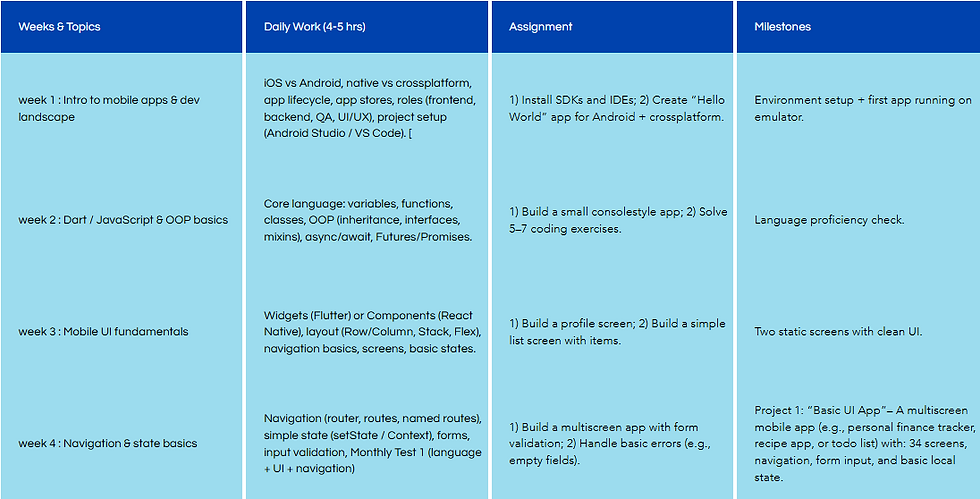
Weeks & Topics | Daily Work (4-5 hrs) | Assignment | Milestones |
|---|---|---|---|
week 1 : Intro to mobile apps & dev landscape | iOS vs Android, native vs crossplatform, app lifecycle, app stores, roles (frontend, backend, QA, UI/UX), project setup (Android Studio / VS Code). [ | 1) Install SDKs and IDEs; 2) Create “Hello World” app for Android + crossplatform. | Environment setup + first app running on emulator. |
week 2 : Dart / JavaScript & OOP basics | Core language: variables, functions, classes, OOP (inheritance, interfaces, mixins), async/await, Futures/Promises. | 1) Build a small consolestyle app; 2) Solve 5–7 coding exercises. | Language proficiency check. |
week 3 : Mobile UI fundamentals | Widgets (Flutter) or Components (React Native), layout (Row/Column, Stack, Flex), navigation basics, screens, basic states. | 1) Build a profile screen; 2) Build a simple list screen with items. | Two static screens with clean UI. |
week 4 : Navigation & state basics | Navigation (router, routes, named routes), simple state (setState / Context), forms, input validation, Monthly Test 1 (language + UI + navigation) | 1) Build a multiscreen app with form validation; 2) Handle basic errors (e.g., empty fields). | Project 1: “Basic UI App”– A multiscreen mobile app (e.g., personal finance tracker, recipe app, or todo list) with: 34 screens, navigation, form input, and basic local state. |
Month 2 – Data, APIs & App Features (Weeks 5–8)
Weeks & Topics | Daily Work (4-5 hrs) | Assignments | Milestones |
|---|---|---|---|
week 5 : Networking & REST APIs | HTTP methods, JSON parsing, REST API concepts, calling APIs, error handling, loading states. | 1) Create an app that fetches data from a public API; 2) Display data in a list with loading/error states. | APIcalling demo + code. |
week 6: Local storage & offline | SharedPreferences / AsyncStorage, SQLite / Hive / Room, how to store and retrieve data, caching basics. | 1) Store user settings locally; 2) Save todo items offline. | Offlinefirst miniapp. |
week 7 : Device features & sensors | Camera, location (GPS), contacts, notifications, biometric auth, permission handling. | 1) Build an app that uses camera + location; 2) Add push notifications (mock). | Device feature checklist + demo. |
week 8 : State management & architecture | Advanced state (Provider / Bloc / Reduxstyle), folder structure, separation of concerns, Monthly Test 2 (API + storage + features). | 1) Refactor Project 1 or 2 with proper state management; 2) Add a new feature using state. | Project 2: “FeatureRich Mobile App”– An app with: login (mock or real), API data display, local storage, at least one device feature (camera/location/notifications), and proper state management. Example: weather app, news reader, or task manager with offline mode. |

Month 3 – Authentication, Backend & Capstone (Weeks 9–12)
Weeks & Topics | Daily Work (4-5 hrs) | Assignment | Milestones |
|---|---|---|---|
week 09 : Authentication & Firebase | Firebase Auth (email/password, Google, Apple), security rules, basic Firestore, user sessions. | 1) Add login/signup with Firebase Auth; 2) Store user data in Firestore. | Auth enabled app branch. |
week 10 : Testing & debugging | Unit tests, widget/component tests, debugging tools, logging, performance basics, crash reporting. | 1) Write 3–5 unit/widget tests; 2) Fix 2–3 simulated bugs. | Test report + bugfix log. |
week 11 :App performance & deployment | Optimization (image size, API calls), app icons, splash screens, packaging, building APK/IPA, Final Test (MCQ + practical app challenge). | 1) Optimize app size; 2) Build release APK / test build. | Release ready build. |
week 12 : Capstone & portfolio | Endtoend app: concept → UI design → coding → tests → deployment; portfolio presentation, Final Project Review | 1) Polish capstone app; 2) Write README and 1–2 page report; prepare short demo video. | Project 3: “Capstone Mobile App” – A complete mobile app (e.g., ecommerce mini app, fitness tracker, learning app, or social feed) with: authentication, API integration, local storage, at least one device feature, proper state management, tests, and a productionlike build (APK/test flight) + portfolio documentation |
